

Why Isn’t My Ford SYNC 3 Bluetooth Working?
Ford SYNC 3 makes it easy to stay connected by offering hands-free calling,
music streaming, voice commands, navigation, and seamless smartphone
integration. But like any technology, Bluetooth can occasionally run into
problems. Whether your SYNC 3 Bluetooth is disconnecting, lagging, or refusing
to pair, the good news is that most issues are easy to fix. This guide breaks
down the most common Ford SYNC 3 Bluetooth problems and gives you simple,
step-by-step solutions. If you’re in the Daytona Beach area and need help,
Gary Yeomans Ford Daytona Beach is always here to assist.
What Are the Most Common Ford SYNC 3 Bluetooth Problems?
Many Ford owners experience similar connectivity issues. Here are the most common SYNC 3 Bluetooth problems:
- SYNC 3 Bluetooth keeps disconnecting
- Bluetooth lag or slow response
- Bluetooth audio not working
- Music cutting in and out
- Phone dialing “0” during calls
Knowing the exact problem helps you find the right fix quickly.
How Do You Fix Ford SYNC 3 Bluetooth Problems?
Before trying advanced steps, start with the basics. Make sure your phone’s
Bluetooth is turned on, your SYNC system is updated, and your vehicle is in
park. Below are the most effective solutions.
1. How Do You Reset Ford SYNC 3?
A system reset can fix disconnecting Bluetooth, frozen screens, audio lag, and
temporary glitches. To reset SYNC 3:
- Turn your vehicle on without starting the engine.
- Press and hold the power button on the SYNC 3 system for about 10 seconds.
- Wait for the screen to shut off and restart.
- Reconnect your phone once the system reboots.
This quick reset often solves minor connection issues instantly.
2. How Do You Update Ford SYNC 3 Software?
Outdated SYNC software is one of the biggest causes of Bluetooth issues. Updates can fix bugs, improve performance, and stabilize Bluetooth connections.
- Open the SYNC 3 Settings menu.
- Select “General” then “Automatic Updates.”
- Connect to Wi-Fi if possible.
- Install any available updates.
Updating your SYNC system often resolves lag, audio glitches, and disconnection
problems. Need help?
Visit our Service Center
at Gary Yeomans Ford Daytona Beach for expert assistance.
3. How Do You Re-Pair Your Phone to SYNC 3?
Sometimes the pairing connection becomes corrupted. Removing the old pairing and starting fresh often fixes issues like audio failure, lag, and calls dialing incorrectly.
Here’s how to repair your device:
- Go to SYNC 3 Settings → Bluetooth.
- Select your device and click “Remove.”
- Turn Bluetooth off and back on from your phone.
- Search for “Ford SYNC 3” on your phone and pair again.
This refreshes the connection and often solves multiple Bluetooth problems.
4. How Do You Fix Ford SYNC 3 Audio Issues?
Audio cutting out, delayed sound, or distorted playback is usually caused by app issues, low phone memory, or outdated software. Try these simple steps:
- Test multiple apps to see if the issue is isolated.
- Restart or update the problematic app.
- Close unused apps running in the background.
- Make sure the volume is turned up on both your phone and SYNC system.
If the issue continues, schedule a diagnostic:
Schedule a Service Appointment.
5. What Causes Bluetooth Interference in Ford Vehicles?
Too many Bluetooth devices can cause interference, leading to dropped connections or poor audio quality. To reduce interference:
- Turn off Bluetooth on unused devices in your car.
- Disable other electronics that may interfere with the signal.
- Connect only one device at a time when possible.
Reducing interference helps SYNC 3 maintain a consistent connection.
6. Is Your Phone Compatible With Ford SYNC 3?
Some older phones or outdated operating systems may struggle with SYNC 3. Before troubleshooting further:
- Update your phone to the latest operating system.
- Check Ford’s compatibility list online.
- Ensure SYNC 3 has permission to access your contacts, calls, and media.
Using a compatible device ensures smoother performance and fewer issues.
How Can You Keep Your Ford SYNC 3 Bluetooth Working Smoothly?
Once you resolve the issue, maintaining your system helps prevent future
disconnects. Keep your SYNC 3 software and phone updates current, avoid
overcrowding your Bluetooth device list, and restart the system occasionally.
These quick steps keep your connection strong for everyday driving in and
around Daytona Beach.
If you’re ready for a new Ford with modern connectivity features,
browse our new inventory
at Gary Yeomans Ford Daytona Beach.
What Do Bluetooth Profiles Have to Do With SYNC 3?
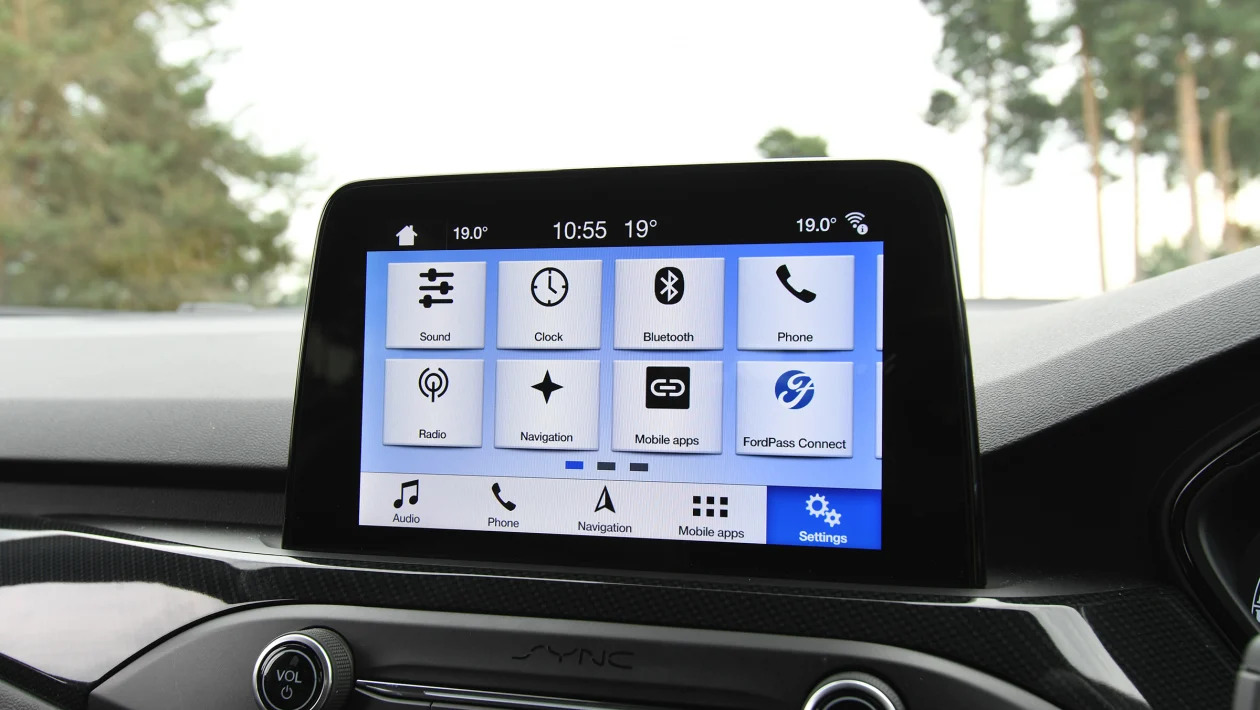
Bluetooth relies on profiles that control how your phone communicates with
your vehicle—things like audio streaming, calling, and contact sync. If your
device uses outdated or incompatible profiles, SYNC 3 may have trouble
connecting. Android users especially should ensure permissions are set
correctly for calls, contacts, and media.
When Should You Get Professional Help?
If you’ve tried resetting, re-pairing, updating, and troubleshooting without
success, the issue may be hardware-related. Faulty Bluetooth modules, wiring
problems, or deep software faults require expert diagnosis.
Our certified Ford technicians can run a full SYNC diagnostic and repair any
Bluetooth-related issues. If you’re still experiencing problems, schedule a
visit or explore financing options:
Visit the Finance Center.
Final Thoughts on Fixing Ford SYNC 3 Bluetooth Issues
Ford SYNC 3 Bluetooth problems are usually easy to fix with simple steps such
as updating the software, resetting the system, checking compatibility, and
repairing your phone connection. If problems persist, the expert team at
Gary Yeomans Ford Daytona Beach
is ready to help you get your SYNC 3 system working like new.
0 comment(s) so far on Why Isn’t My Ford SYNC 3 Bluetooth Working?